/eh/2025-01-08/173633966714069467/picture.png)

/eh/2024-12-24/173503345348979036/Favorite-Icon.png)
/eh/2025-07-08/1751962110204480194/picture.png)
/eh/2025-06-21/1750485478958537574/countryInfoIcon.png)
/eh/2025-06-21/1750485741321434291/Hi-Sign-in-My-Nihao.png)
/eh/2025-06-21/1750485837193896318/cart.png)
/eh/2025-06-21/1750485968202533847/cart.png)
/eh/2025-04-17/1744862476612819675/hot-img.png)
/eh/2025-11-07/1762504524550532584/header-icon.jpg)
/eh/2025-07-07/1751875582852206790/header-icon.png)
/eh/2025-07-07/1751875587886277738/header-icon.png)

Best in 7 days


Shopping security
FontLab 8 is an integrated font editor for Mac and Windows that helps you create fonts from start to finish, from a simple design to a complex project, and brings a spark of magic into type design.
With FontLab 8.4, you can create and edit OpenType fonts, variable fonts, color fonts and web fonts - for any Unicode writing system, from Latin, Cyrillic, Greek, Arabic, Hebrew and Indic, all the way to Chinese, Japanese, emoji, symbols and icons. Adjust spacing, kerning and hinting. Convert between font formats. Add new weights and styles to existing font families.


has 500 improvements over FontLab 8.0, 900 improvements over FontLab 7, and 1,400 improvements over FontLab VI. It’s easier to learn and use, it’s better, and it’s faster. Used by thousands of font professionals worldwide, FontLab 8 is FontLab's biggest upgrade ever!
Discover the new dark UI theme, adjustable Stroke and Brush sketching, polished drawing and editing, non-destructive transformations with Delta, visual and numeric measurement, glyph building with Skin and variable components, spacing and kerning with mouse and trackpad, right-to-left kerning, batch font export and Actions sets, revamped color and gradients, plus support for .glyphs 3, FontForge, COLRv1, and Python 3.
NEW! features include:
Explore & Prepare
FontLab 8 is an integrated font creation workhorse. It offers you a smooth, complete, cross-platform environment for professional typeface design, font engineering, and vector graphics design, from start to finish.
Blaze through your workflow with unrivaled speed and fluidity, even with the most complex designs. The interface is supremely flexible, with customizable workspaces, dockable panels, and multiple views to suit your needs. Contextual help is always at your fingertips: just hover over any UI element and press F1 to instantly see how it works.
Draft & Draw
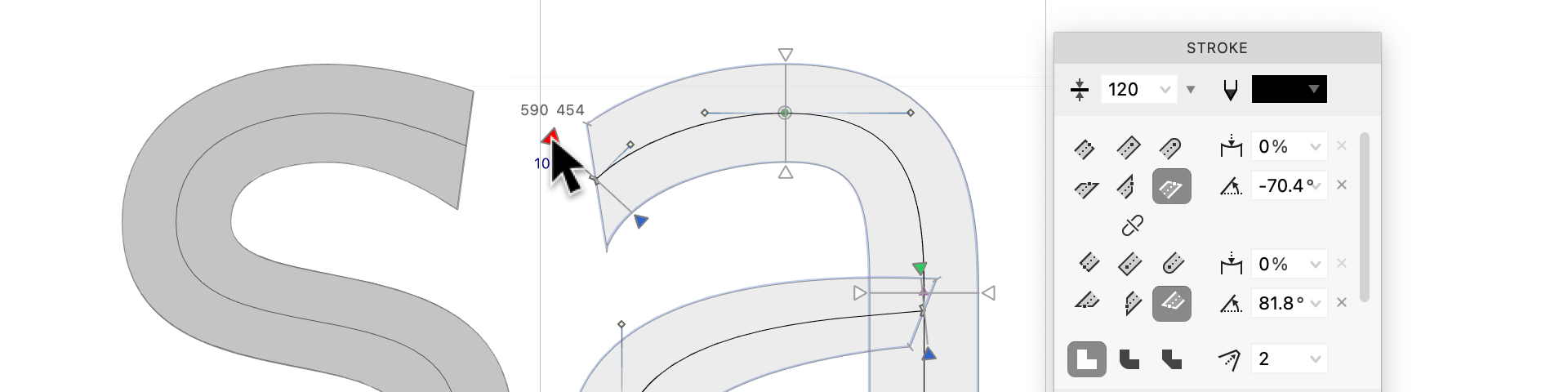
With FontLab, the creative freedom is truly yours. FontLab’s precise, powerful, professional typographic toolkit is at your complete disposal.
Sketch freely on the unlimited Sketchboard canvas, or dive right into drafting separate glyphs and icons. Effortlessly copy-paste or import SVG, PDF and bitmaps, and use them natively, or convert into editable vectors with customizable autotracing.
Explore expressive, adjustable calligraphy with live Power Stroke and pressure-sensitive Power Brush. Masterfully draw with our uniquely efficient Rapid and traditional Pen tools, with versatile Pencil, and with precise geometric tools. All this in pixel-perfect integer coordinates or ultra-high fractional precision.
Edit & Refine

In FontLab, typeface-oriented vector editing is intuitive, fluid and delightfully smart. “Best vector engine,” they say. “Continues to impress,” they say. “Amazing”, “innovative”, “very addictive,” they say.
Reshape curves, splice contours and fill segments with clever Contour, Knife and Fill tools. Drag points while others follow intelligently with Nudge and Power Nudge. Move nodes precisely without zooming in using the innovative Lever. FontLab editing tools let your creativity flow.
Optical Separation of Open Contours
If you select a vector drawing in the Glyph window or on the Sketchboard, and perform Element > Optically Separate, FontLab splits the non-overlapping parts of the vector drawing into separate elements. You can control how this works in Preferences > Operations > Optical separation. Now, optical separation correctly splits centerline vector images (open contours).
Importing Metrics
You can now correctly import metrics data from JSON files, you can now import metrics for multiple masters simultaneously, and you can import metrics expressions from JSON files.
Copying Metrics Between Masters
You can now copy the numeric value of a glyph metric (the advance width, the left sidebearing or the right sidebearing) of the current glyph from the current master to all other masters.
Kerning Matching & Interpolation
If a master is an intermediate master on one axis but an edge master on another axis, FontLab now correctly interpolates values for kerning pairs that are not defined in the master. This works with Match Kerning and during export. Previously, undefined kerning pairs were assumed to be 0 in this case.
Match Kerning now prioritizes kerning classes from the default master. If no kerning classes are found in the default master, it will use kerning classes from one of the corner masters. This addresses situations where kerning data is defined in the corners of the design space and needs to be interpolated for the default master.
Font Info Overview
In the Font Info dialog, the Overview page now lets you easily see entries that differ across masters.
For each row that often has identical values across all masters, FontLab highlights the row with yellow background if the values differ. In addition, if most masters have one particular value but there are some obvious outliers (values that occur much less often), FontLab will highlight these outliners with red text. FontLab won’t do this comparison for rows that typically have different values like Style name.
Font Dimensions Colors
In Preferences > Grid, Guides & Hints, you can now change the color of the font dimension lines as shown in the Glyph window. This way, you can make the Ascender, Caps Height, x Height and Descender lines more or less visible in the Glyph window canvas. You no longer can change the color of the font dimension lines in the property bar, as this was not properly working.
And Much, Much More!
Ships within 48 hours · Estimated delivery Jun 22 - Jun 27
US$40
Get nowSign up to your membership to get coupons up to
15%
Get nowOpportunity to enjoy order discount up to 15% off
Top-Converting Item to Boost Your Average Order


